Mention @somebody. They’re notified.
Ever wish you could summon a particular someone to take a look at an issue or pull request? Now you can: When you @mention a GitHub username anywhere in the…
Ever wish you could summon a particular someone to take a look at an issue or
pull request? Now you can:
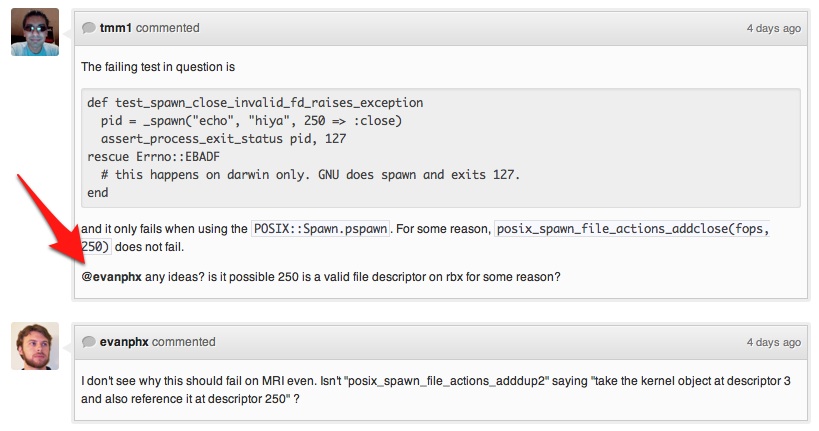
When you @mention a GitHub username anywhere
in the context of an issue or pull request, that person is notified and
subscribed to future updates.
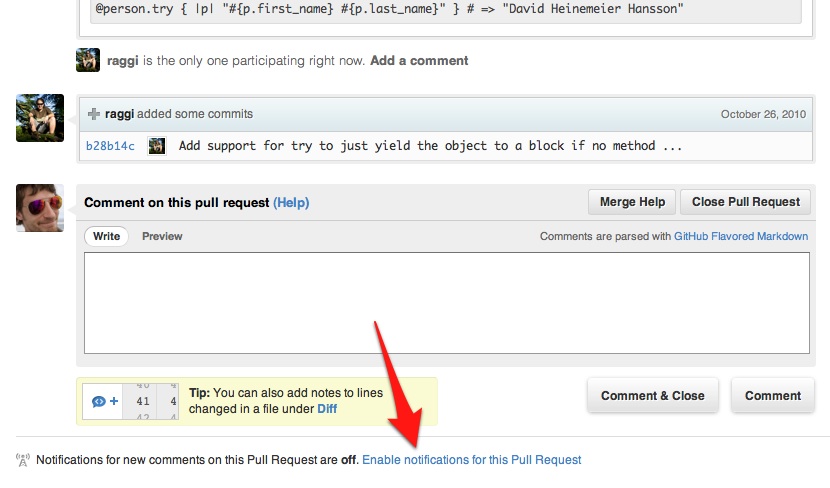
Better Notification Controls
You can also now manage notification settings at the individual issue or pull
request level. This lets you manually subscribe to any issue without commenting,
or unsubscribe from issues no longer relevant to your interests:
Disabling @mention Notifications
Would you rather not be notified when mentioned? Disable
@mention notifications in the
Notification Center
under Account Settings:

Written by
Related posts

GitHub joins coalition advocating for fixes to California AI Transparency Act to protect open source
We’re calling for targeted amendments to resolve conflicts with open source licensing and align with international transparency frameworks while preserving regulatory intent.

GitHub availability report: May 2026
In May, we experienced nine incidents that resulted in degraded performance across GitHub services.

GitHub Universe is back: All together now, in the agentic era
GitHub Universe is back: returning to the historic Fort Mason Center in San Francisco on October 28–29, 2026.