NVIDIA’s New AI Servers Run On Hotub Coolant And Don’t Need Evaporators

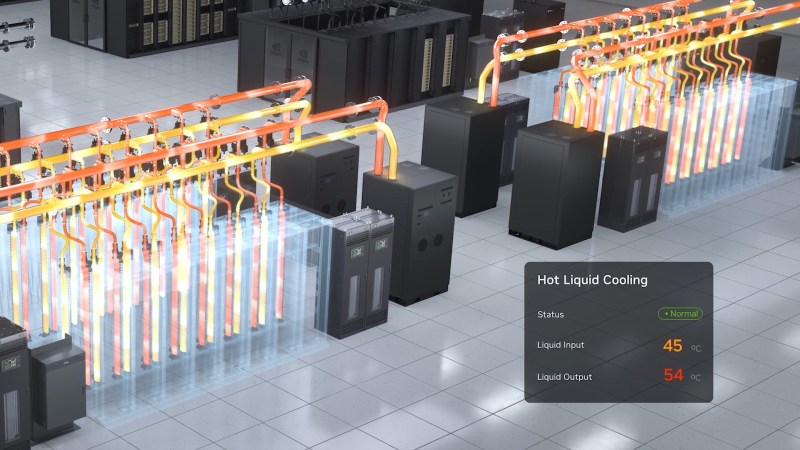
When people start ranting about AI, you can be sure a few things are going to come up during the two-minutes hate: job loss, higher power bills, the neverending tide of low-effort slop, and wasting precious freshwater. Well, NVIDIA wants to take away that last one, beacause the all-water cooled Ruben architecture won’t need any evaporative cooling— coolant can stay in a closed loop, and never needs to be cooled below 45 C, or 113 F.

This sort of coolant loop should be familiar to anyone who has ever built a water-cooled PC or PlayStation: there’s a glycol-water mix, water blocks, and a radiator to reject heat to the environment. NVIDIA doesn’t mention if their new servers come with RGB lighting, but we’d like to imagine it’s an option. The big difference — aside from the rainbow LEDs– between a Ruben server and your old gaming rig is that in these racks, everything is on a waterblock. If there’s a chip on the motherboard generating heat, it’s getting rid of it into the same cooling water. Cooling water, that we have to emphasize, needs only be cooler than the chips themselves: in this case, they’re talking 45 C on the cold side, and 55 C headed out of the racks. (That’s 113 F to 131 F for all the bald eagles reading this.)

Given the required temperature drop is so modest, there’s no need for the evaporative chillers that have given AI data centers such a bad name in water conservation circles. Just like in a water-cooled PC, ambient-temperature air running over dry heat exchangers– also known as big honkin’ radiators–is able to handle the cooling, so no water is lost. Since everything is on waterblocks, there’s no need for cooling air, either, and the server farms need only be air conditioned to the degree required to make them comfortable to work in.

If you think NVIDIA is making this change because they suddenly care about water conservation, think again. The press release makes their motivations very clear: cooling costs money, and running this hot saves a lot of it. We’re talking four mil US a year for a 50 MW hyperscaler. One might suspect that this sort of thermal regime could limit the lifetime of the hard-working NPUs, but since they’ll be obsolete in a few years anyway, that’s not likely a big concern, especially not for NVIDIA.

We’ve actually seen hotter fluids used to cool computers before– coffee, for one. Water cooling also isn’t new in the data center world; we took a look at it a few years back. Things are clearly heating up now, though.
Reflective LCD Slabtop Terminal Runs Homebrewed Solar OS

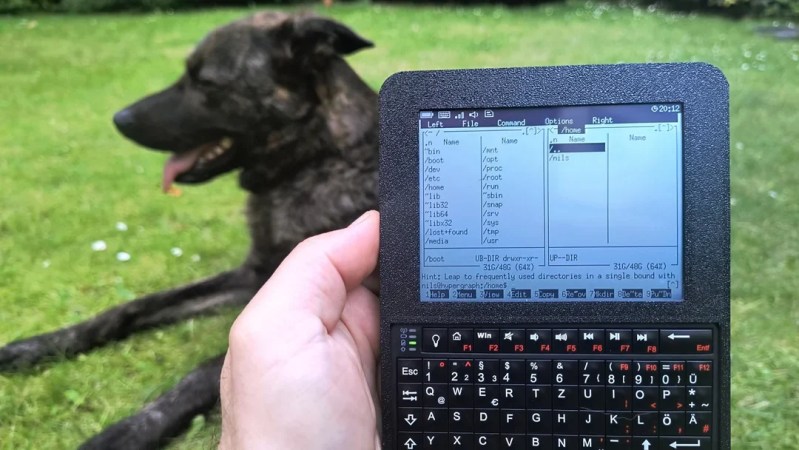
Have you ever spotted something in a catalog or on a website and just known you had to build a project around that one part? That’s how [nilseuropa] felt about the Waveshare ESP32-S3-RLCD-4.2, which — as you might guess from the name — pairs an ESP32-S3 with a reflective LCD. With a screen reminiscent of a palmtop of yore, [nilseuropa] wanted a personal device, and needed something to run on it. That’s where Solar OS comes in.

Physically he’s paired the Waveshare board with a mini keyboard and put them together in a handsome 3D printed case with a battery. The slabtop form-factor was more for ease-of-creation than any preference; in the project’s reddit thread [nils] is reaching out for help making something cooler, possibly of the palmtop form-factor. He also describes some of the thinking behind his operating system.

You had us at “terminal”.

He’s not starting entirely from scratch: it’s based on FreeRTOS and the ESP-IDE toolset. Right now all applications are built with the OS into a single binary, while the SD card on the Waveshare board handles persistent storage. The interface is pure text, with all applications launched via shell commands. That doesn’t mean you have to go back to your PC to add anything, however.

The system is user-programmable, with Python and Lua scripting as “first class citizens”, having access to the hardware through the Solar OS APIs. As for the applications built into the firmware, it looks like along with the serial terminal, you get quite a lot: an orthodox file manager à la Norton Commander, networking tools that include a web browser and chat client, MP3 player, image viewer, text editor, games, and more.

While they are obviously pretty niche projects, we do appreciate that there’s a growing collection of homebrew operating systems that you can run on your bespoke computing device.

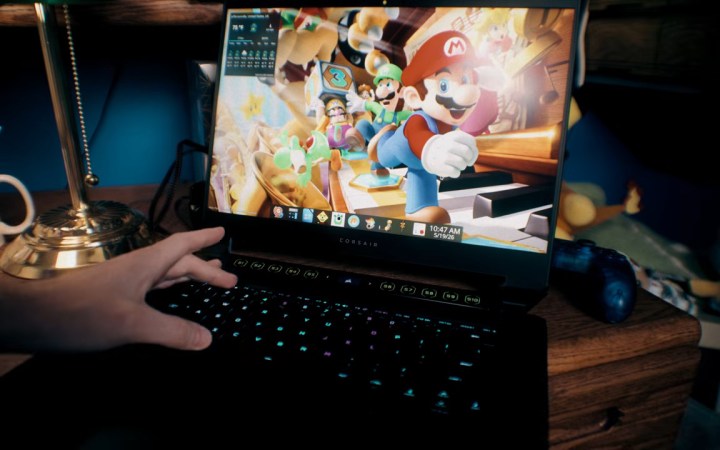
This Kid-Friendly Laptop Build Is The Antidote To Age Verification

Age-verification has been a topic of hot debate recently, with many in the community feeling that keeping kids safe online is better handled by the parents. But what does that look like these days? [EposVox] has been working on a child-safe laptop to try and solve the problem, but depending on how you look at it, it also shows why non-technical people may feel they need the government involved.

His setup may seem simple to many readers — a carefully curated selection of edutainment apps running under Kubuntu on an old laptop. We particularly like his choice not to give access to the applications menu, but give himself a hotkey for the terminal if he needs to access something outside of the curated selection of software. Most things are local, though some browser games and cloud tools are made available via Vivaldi’s app mode. In this case there is no actual browser access for junior just yet, as the child in question is seven years old.

All in all, it sounds like less than an hour to set up. Assuming you’ve got experience with desktop Linux, anyway. Consider, though that it took [EposVox] an entire day just to get Kubuntu installed, and you begin to see why the average person might look kindly on a politician offering to solve these problems for them. For those that need it, [EposVox] points out some Windows-based alternatives for childproofing your PC, including the absolute minimum of DNS filtering. But the same problem applies: how many people outside our bubble know how to set that up?

While there’s an argument to be made that the sort of age-verification laws being passed are examples of government overreach, these laws aren’t facing a lot of push-back because most people aren’t technically literate enough to realize the problems with them. They like the idea of their kids being protected, and they don’t know how to set up an old PC the way [EposVox] does here.

It’s a real shame, especially considering that none of this is new. We featured a kid-friendly, Windows-based computer setup years ago. But it is what it is. Hopefully these sorts of hacks don’t end with the roll-out of age verification, because it’s a much better way to do it.

Continue reading “This Kid-Friendly Laptop Build Is The Antidote To Age Verification”

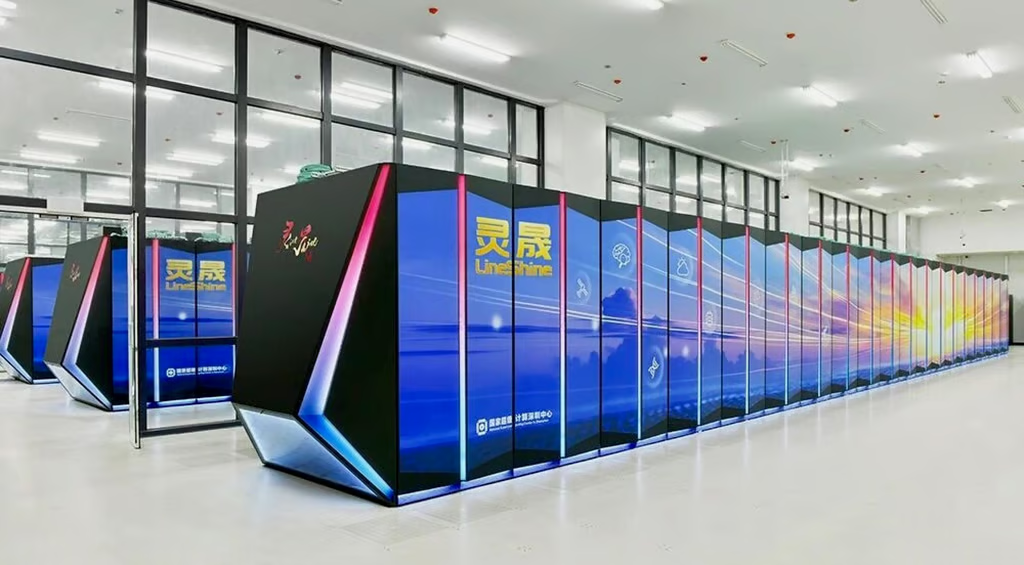
LineShine Is Fastest Supercomputer At Over 2 Exaflops

There is a phenomenon where as you get older, your sense of scale becomes somewhat fixed in the earlier era that shaped you– things like expecting the Dollar Store to carry items for 1$, or to get a burger and fries for less than twenty bucks– or, in this case, thinking of supercomputers as being petaflop-scale machines. That’s not wrong, per se– most of the world’s fastest machines benchmarks are best measured in petaflops– but when you’re clocking at 2198 of the things, it becomes easier just to say that the LineShine computer can do 2.188 exaflops. At double precision. With CPUs only. Yes, we are impressed.

Even more impressive is that this machine just debuted in China, which means it was built without the benefit of the latest-and-greatest Western chips, thanks to US sanctions. It’s using a made-in-China LX2 CPU with 304 ARMv9 cores onboard. Well, it’s actually using around 46 thousand of them, but who’s counting?

Each CPU actually consists of two separate compute dies and onboard high bandwith memory (HBM) and DRAM– 4GB of HBM and 32GB of DDR5. The 152 ARMv9 CPU cores on each chip are all built with Scalable Vector Extensions (SVE) and Scalable Matrix Extensions (SME), so despite the lack of GPUs LineShine will have no problem doing the sorts of vector processing that is traditional for high-performance computing, given the 13.79 million cores.

On the other hand, the lack of GPUs shows when you change benchmarks– LineShine is number one in the rankings for High Performance Linpack (HPL), but getting outside the 64-bit box, the supercomputer only hits number four on the HPL-MxP mixed-precision benchmark, behind machines that pair their CPUs with accelerators like GPUs or NPUs. That may mollify the American ego, as while their El Capitain was bumped to second place on the HPL list, they can still claim the pole position on HPL-MxP. Which computer is actually more capable depends entirely on what you want to do with it, and neither Lawrence Livermore National Laboratory nor China’s National Supercomputing Centre in Shenzhen advertise their compute queues, though this paper suggests at least one job will be crunching earth observation data.

The definition of a supercomputer has shifted over time, and it’s only a matter of time before LineShine and El Capitain end up on the auction block, like other supercomputers before them. We might question it when it comes to desktops, but for institutional HPC, no amount of computing ever seems to be enough.

One Commodore, Five Displays

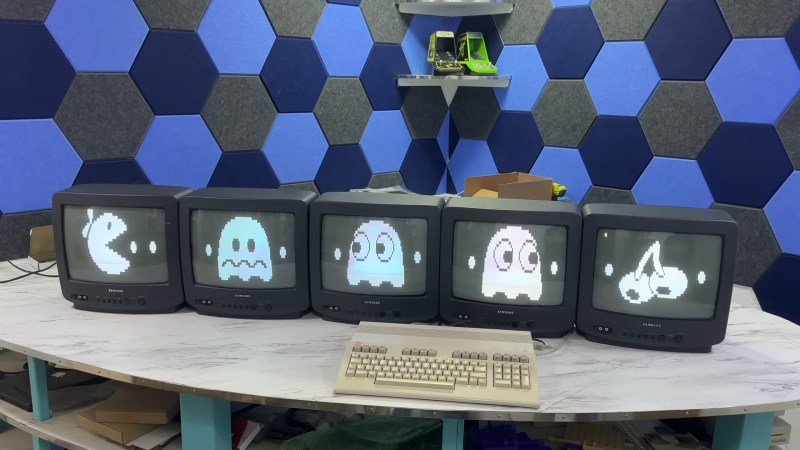
If you had one monitor back in the 8-bit era, instead of having to wait to use the family TV, you were already amongst the blessed. If you had five, maybe you worked at a computer store– but if you did, you could have done what [The 8-Bit Guy] demonstrates in a recent YouTube video and plug all five (5) monitors into a Commodore 128.

The computer isn’t modified in any way– well, except for the now standard use of an SD card disk emulator– so what gives? Well, you probably guessed he’s splitting up the colour signal into multiple monochrome images, but since the C128 actually has an RGBI, that I– intensity– actually gives another signal that can be broken out. That makes for four screens being driven from that port via composite, all sharing the same sync. The hardware for that was actually designed for [The 8-Bit Guy] by [Joe Burks] who open sourced the design on GitHub. He’s also selling them on Lectronz.

The fifth screen, of course, is driven by the VIC-II chip that Commodore provided for composite output to begin with. The interesting part is as much the software as the hardware, and while [The 8-Bit Guy] explains some of the thinking behind what he’s doing, he doesn’t link to any BASIC. If you know your way around a Commodore, you should be able to encode the multi-colour images required to do the splits.

For the people who prefer “real computers” — that is IBM compatible PCs– [The 8-Bit Guy] goes a bit outside of his 8-bit comfort zone to demonstrate that this same trick works quite well with the 16-color modes of EGA. With sixteen colours split between the two monitors, you of course get two colours each– combine the dithering with the blur of an old CRT, and it looks better than it has any right to. Just note that you need to have the right EGA card, as some blocked the 16-colour modes when set to output IRGB/CGA– he used a Trident card to good effect. The software here, though, was just Deluxe Paint, which can’t stop winning, even after four decades. 

The hack seems simple enough, and perhaps everyone knew about it back in the day, but this is the first time seeing it for this author. So we’ll leave it to the comments: have you ever seen a 5-display Commodore, or 4-screen EGA output done like this?

Of course CGA had some competition back in the 80s, and it would be fun to see how many retro standards this trick would work on; at the end of the video [The 8-Bit Guy] discusses splitting VGA signals, but that’s only three screens and way too new for him. If one of you takes up his challenge, please let us know. 

A Commodore Boombox: The 1530 As You’ve Never Heard It Before

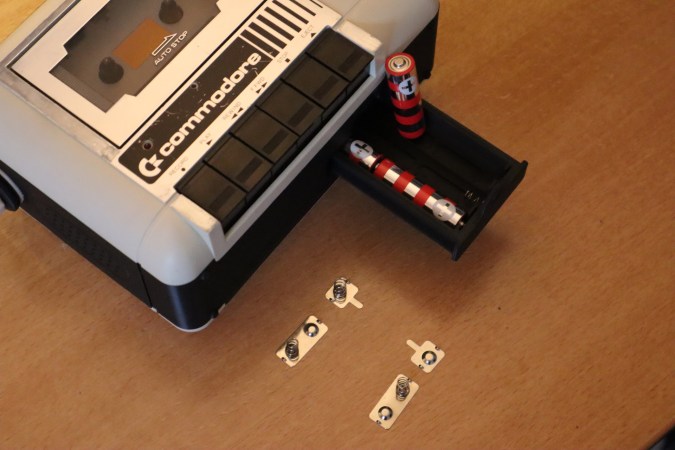
No, this isn’t another product from [PeriFractic]’s revived company, though we hope he’s taking notes. This is, in fact, a hack on the beloved 1530 Datasette, using the tape mechanism and case to create a portable audio device for your precious remaining mix tapes. Well, [Jan Derogee]’s precious mix tapes, at any rate; we aren’t the government, we don’t know if you have any tapes, mixed or otherwise.

[Jan] started, obviously enough, with a Datasette, but they key was apparently to use a Made-in-Japan model–  the Made-in-Taiwan units are a later development and victims of the old Commodore’s infamous obsession with cost-cutting. The main difference is that the Japanese-built Datasettes have two sets of screws: one to hold the tape mechanism in place, and the other to hold two halves of the case together. The Taiwanese units make one set do double duty. Doubtless more was saved through streamlining assembly than the cost of four screws, but either way it made those models difficult to work with for [Jan]’s purposes.

As you likely can tell from the photo, he simply splits the case, allowing the tape transport to remain in place with those  Japanese screws, and inserts a 3D printed spacer to hold speakers, audio amplifiers, and a bay for AA batteries. For the people who really care about such things, the mod appears to be fully reversible, though you won’t be able to use it as data entry for your C64 until you do reverse it. Given how slow and dodgy tape loads could be, though, that’s not likely to bother many people, since it’s so much easier to load media onto the old breadbox from an emulated tapedeck.

If, on the other hand, you can’t stand the idea of using a Datasette for anything but data storage, maybe you should try connecting yours to a modern PC to remind yourself what it was really like. In either case, you can check out the 1530 Boombox at the link above or the video embedded below. For the actual Commodore product we didn’t see coming, click here for the phone. 

Bortle-1 Skies in the heart of darkest Texas.

“Telescope Rancher” Is The Coolest Job You Didn’t Know Existed

McCulloch County, Texas, is smack dab in the middle of a very large state. We wouldn’t exactly call it the middle of nowhere, but given there’s so little light pollution it scores a 1 on the Bortle Scale, it’s not exactly the Big Apple, either. [Bray Falls] lives there, and has a job description we have become immediately jealous of: [Bray] is a telescope rancher.

Like the song goes, the stars really are big and bright at night deep in the heart of Texas. Not only is his ranch free of the light pollution that plagues more urban locations, central Texas is pretty dry, with only a few days of rain in any given month. That’s not great for agriculture, but it’s great for astronomy since it means the skies are most often cloud-free. Combine that with access to high-speed internet, and you have the makings of a telescope ranch.

Telescopes being let out of the barns for the night.
Image: Starfront Observatory

It’s brilliant in its simplicity: along with his own ‘scopes, [Bray]’s Starscope Observatory hosts hundreds of other people’s CCD equipped goto telescopes, all set up to be remote controlled over the information superhighway. On clear nights– which again, is most of them–the roofs roll off the telescope barns and observations can begin. Pad rental comes with tech support, too, so you don’t have to fly out to heart of darkest Texas if your mount gets jammed or you lose signal for any reason. That said, you should be sure to read the fine print before signing up, because said tech support probably doesn’t apply if you 3D printed your own ‘scope, or built your own mount.

That said, having gone to the effort of doing all that, would you really send your baby away to a farm upstate? Best reserve that for the old Celestron collecting dust in the corner. If you think we should be leaving these observations to the pros, be aware [Bray] has apparently discovered a very oddly-placed supernova remnant, 40 degrees off the galactic plane in Virgo. So this isn’t just a rewarding hobby; it’s still science, too.