Bringing Swift To The Apple II

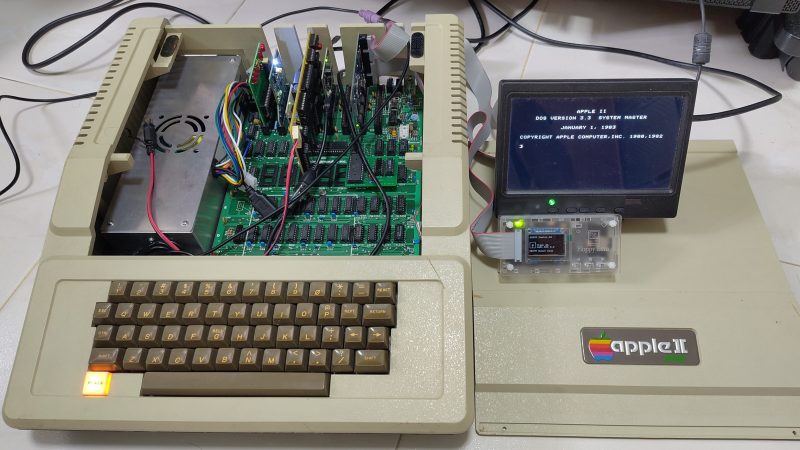
Swift is a relatively modern program language, appearing in 2014 as a replacement for Objective-C. Since then, it’s become a popular solution for programming apps across Apple platforms. That led [Yeo Kheng Meng] to a simple yet fun idea—porting Swift to the oldest Apple platform of all.

Yes, [Yeo] managed to build a development environment for Swift that targets the Apple II platform. Not just one machine, either—everything from the original Apple II up to the IIe and a little beyond. Now, the Apple II is very different from modern Macs and iPhones and the like, having debuted in 1977 with a 1 MHz 6502 CPU and a minuscule 4 KB of RAM. But that doesn’t mean you can’t use a modern language to develop for it!

[Yeo] does a great job of explaining how it all works, and how Claude Code and GPT 5.5 Codex were used to help piece things together. The compiler is set up to spit out bytecode that’s executed by a virtual machine running on the 6502. The target was to allow the setup to work on a standard 1977 Apple II from the factory, which would allow it to then run on subsequent models without issue. However, there is a small note— [Yeo]’s implementation requires the RAM to have been upgraded to 48 KB.

We love seeing modern stuff ported to the Apple II. This Portal port was a particular highlight.
Continue reading “Bringing Swift To The Apple II”

When Is An Apple Laptop Not A Macbook? When It’s An Apple II

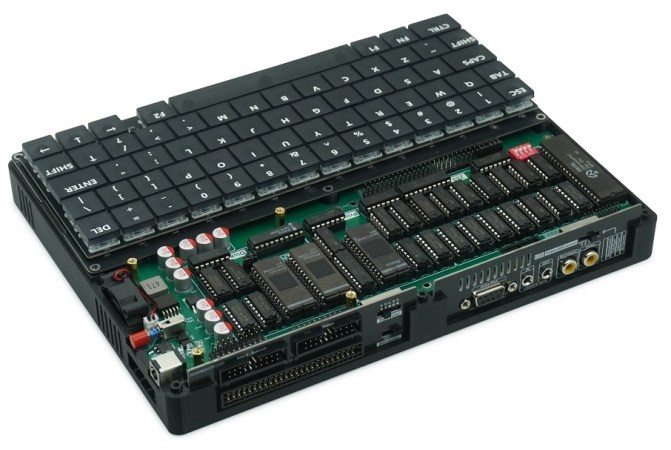
Do you remember, some years ago, when that brand-new 8086-based laptop hit the shelves? Great for PC lovers, but not so fun for those on the fruitier side of the street. Well, the same Chinese firm that brought us the Book8086 are back, this time with an ‘Apple’ Laptop that is decidedly not a MacBook– the Book II is a dual-processor Apple II clone in a laptop form factor.

… but just look at all those DIPs on the inside. Authentically retro!

Dual processor? On an Apple II? It wasn’t that uncommon, back in the day — that’s what the Z80 softcard was, after all: a second processor that let you run CP/M and associated business applications, and this one has it built-in. It also has the 80-column video card, a second floppy controller, a printer interface, and a 16 kB ROM card for languages. That leaves two of the Apple’s expansion slots available, one of which is broken out externally on the back of the laptop, along with the printer and floppy ports.

Useful? Probably no more so than the NEC V20-based PC version. Still, those did find buyers and we have no doubt that this new laptop will, too. Especially since with the right expansion card, you might get this machine running DOS as well. Of course if you don’t feel like shelling out the quid or running an emulator, you can always roll your own Apple II on an FPGA.

Thanks to [Stephen Walters] for the tip! We usually steer clear of product announcements like this, but [Stephen] figured we’d be interested in this one since we covered the then-new retro PC versions way back in 2023.

You Can Now Run MS-DOS Applications On The Apple IIe

After a lot of debugging, [Seth Kushniryk] has managed to get the last issuess shaken out of his port of MS-DOS 2.0 to the Apple II, and has released the project to the public. If you have the requisite AD8088 or similar co-processor expansion card with onboard x86 CPU, this should be all you need to get started.

Although this co-processor card contains effectively a self-contained x86 system, its only I/O goes via the expansion bus, so it has to play nice with the 6502 CPU of the Apple II system. When we last reported on [Seth]’s efforts he had just managed to get MS-DOS 2.0 booting and basically in a barebones working state.

Since then he’s been working on the bridge program that provides communication between the 8088 on the card and the Apple II’s 6502, relocating it in RAM to enable high-resolution graphics, as well as other tweaks and optimizations. Also a lot of bug hunting, including an undocumented ProDOS constraint with a request count.

With all of this done it’s now possible to run basically any MS-DOS 2.0 compatible software, assuming it doesn’t try to write directly to video memory. This does limit the software selection somewhat, but back in the day it would probably have been amazing to have that 8 MHz 8088 purring along the 6502 to run both Apple and DOS software titles. Props to [Seth] for restoring this software functionality that had been lost to the ages.

Continue reading “You Can Now Run MS-DOS Applications On The Apple IIe”

Optimizing A QuickTake Image Decoder For The Apple II’s 6502

The idea of using the Apple II home computer for digital photography purposes may seem somewhat daft considering that this is not a purpose that they were ever designed for, yet this is the goal that [Colin Leroy-Mira] had, requiring some image decoder optimizations. That said, it’s less crazy than one might assume at first glance, considering that the Apple II was manufactured until 1993, while the Apple QuickTake digital cameras that [Colin] wanted to use for his nefarious purposes saw their first release in 1994.

These QuickTake cameras feature an astounding image resolution of up to 640×480, using 24-bit color. Using the official QuickTake software for Apple Macintosh System 7 through 9 the photographs in proprietary QTK format could be fetched for display and processing. Doing the same on an Apple II would obviously require a bit more work, not to mention adapting of the image to the limitations of the 8-bit Apple II compared to the Motorola 68K and PowerPC-based Macs that the QuickTake was designed to be used with.

Targeting the typical ~1 MHz 6502 CPU in an Apple II, the dcraw QTK decoder formed the basis for an initial decoder. Many memory and buffer optimizations later, an early conversion to monochrome and various other tweaks later – including a conversion to 6502 ASM for speed reasons – the decoder as it stands today manages to decode and render a QTK image in about a minute, compared to well over an hour previously.

Considering how anemic the Apple II is compared to even a budget Macintosh Classic II system, it’s amazing that displaying bitmap images works at all, though [Colin] reckons that more optimizations are possible.

Repairing An Obscure Apple II Clone

The Apple II was made in great numbers, as was the Commodore 64. But the Mimic Spartan? It was a weird Apple II clone that you needed a Commodore 64 to use. [ARC Javmaster] has found one of these obscure machines and has set about bringing it back to life. Check out the video below.

The story of the machine has been told online by one of the developers on the project, one [Brent Marykuca]. Basically, the Mimic Spartan was an Apple II clone that was intended to take advantage of a C64 as a host machine. It came in a beige box with a bunch of edge connectors and cables sticking out, and you were intended to nest it on the back of your C64 so it could hook up to all the ports. Then, you could use your machine as a C64 or an Apple II, or sort of… both… and even exchange data between both machines in some limited ways. There are also a few details of this obscure machine that have been collated by [Mike Naberezny], who is seeking the original disk that shipped with the machine when new.

It’s early days yet for [ARC Javmaster]’s efforts to restore the Mimic Spartan. Thus far, it’s had a clean and basic test. It was able to display a short line of text on a display before ceasing activity. A full boot hasn’t been achieved just yet, but we can’t wait to see where the resurrection efforts go next.

Back in the day, there were all kinds of Frankenstein computer cards that effectively put one kind of computer inside another. These days, you can condense an entire retro machine down to run on a single microcontroller.

Continue reading “Repairing An Obscure Apple II Clone”

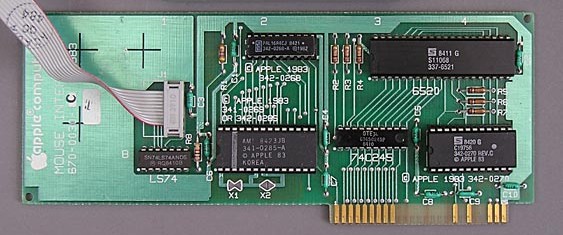
The Apple II MouseCard (Credit: AppleLogic.org)

The Apple II MouseCard IRQ Is Synced To Vertical Blanking After All

Recently [Colin Leroy-Mira] found himself slipping into a bit of a rabbit hole while investigating why only under Apple II MAME emulation there was a lot of flickering when using the (emulated) Apple II MouseCard. This issue could not be reproduced on real (PAL or NTSC) hardware. The answer all comes down to how the card synchronizes with the system’s vertical blanking (VBL) while drawing to the screen.

The Apple II MouseCard is one of the many peripheral cards produced for the system, originally bundled with a version of MacPaint for the Apple II. While not a super popular card at the time, it nevertheless got used by other software despite this Apple system still being based around a command line interface.

According to the card’s documentation the interrupt call (IRQ) can be set to 50 or 60 Hz to match the local standard. Confusingly, certain knowledgeable people told him that the card could not be synced to the VBL as it had no knowledge of this. As covered in the article and associated MAME issue ticket, it turns out that the card is very much synced with the VBL exactly as described in The Friendly Manual, with the card’s firmware being run by the system’s CPU, which informs the card of synchronization events.

Using The Pi Pico As ‘Programmable Hardware’ For The Apple II

When we think of programmable hardware, we think of FPGAs. But they’re not the only option. [Oliver Schmidt] has been exploring how the Raspberry Pi Pico can serve in such a role for the classic Apple II. The talk was presented at the KansasFest event this year, and it’s well worth diving into!

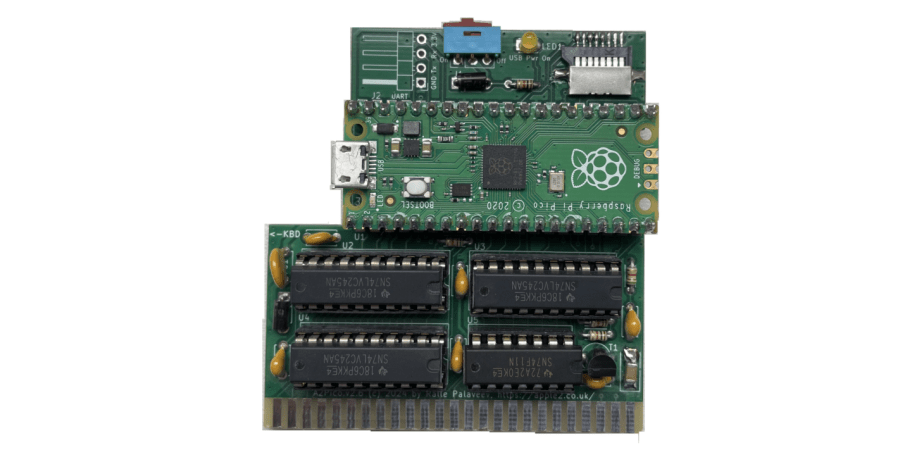
[Oliver] has developed A2Pico. It’s a series of Apple II peripheral cards that are based around the Raspberry Pi Pico, as you might have guessed. [Oliver] has been working in the area since 2021 with one [Glenn Jones], with the duo experimenting with connecting the versatile microcontroller directly to the slot bus of the Apple II. [Ralle Palaveev] then chimed in, developing the A2Pico hardware with solely through-hole components for ease of assembly.

A number of cards have been developed based on A2Pico, including a storage device, a Z80 CP/M card, and a specialized card to play Bad Apple on the IIGS. It’s all thanks to the versatility of the programmable I/O (PIO) peripheral inside the Raspberry Pi Pico. This device enables the Pico to be reprogrammed to handle all sorts of complicated tasks at great speed. This is particularly useful when using it to bit-bang a protocol or talk with another machine, and it serves perfectly well in this role. Basically, by reprogramming the Pico and its PIO, the A2Pico design can become any one of a number of different add-on cards.

It’s well worth diving into this stuff if you’ve ever contemplated building your own peripheral cards for 8-bit and 16-bit machines. We’ve seen some other great add-on cards for vintage machines before, too.

Continue reading “Using The Pi Pico As ‘Programmable Hardware’ For The Apple II”