Reflective LCD Slabtop Terminal Runs Homebrewed Solar OS

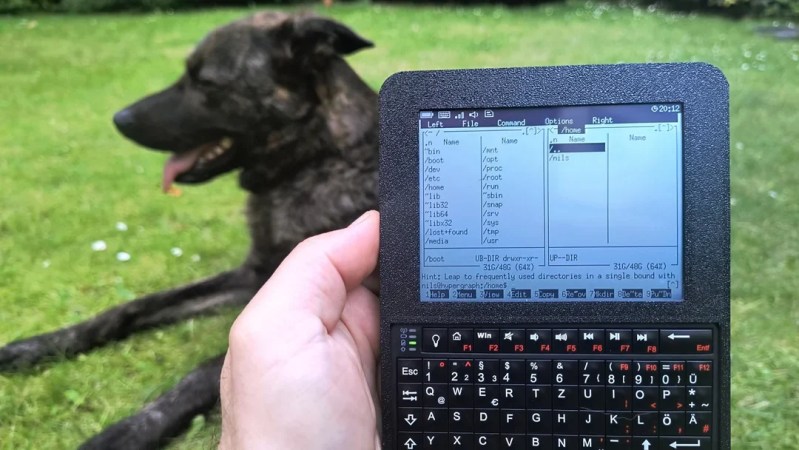
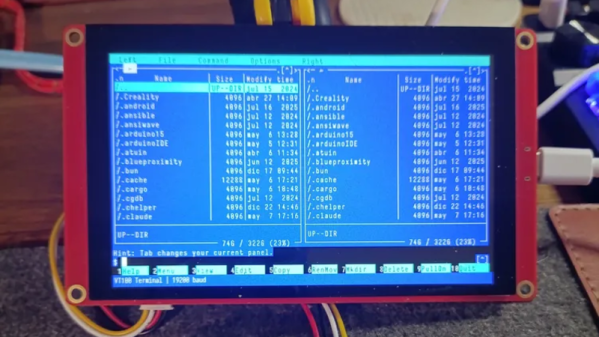
Have you ever spotted something in a catalog or on a website and just known you had to build a project around that one part? That’s how [nilseuropa] felt about the Waveshare ESP32-S3-RLCD-4.2, which — as you might guess from the name — pairs an ESP32-S3 with a reflective LCD. With a screen reminiscent of a palmtop of yore, [nilseuropa] wanted a personal device, and needed something to run on it. That’s where Solar OS comes in.

Physically he’s paired the Waveshare board with a mini keyboard and put them together in a handsome 3D printed case with a battery. The slabtop form-factor was more for ease-of-creation than any preference; in the project’s reddit thread [nils] is reaching out for help making something cooler, possibly of the palmtop form-factor. He also describes some of the thinking behind his operating system.

You had us at “terminal”.

He’s not starting entirely from scratch: it’s based on FreeRTOS and the ESP-IDE toolset. Right now all applications are built with the OS into a single binary, while the SD card on the Waveshare board handles persistent storage. The interface is pure text, with all applications launched via shell commands. That doesn’t mean you have to go back to your PC to add anything, however.

The system is user-programmable, with Python and Lua scripting as “first class citizens”, having access to the hardware through the Solar OS APIs. As for the applications built into the firmware, it looks like along with the serial terminal, you get quite a lot: an orthodox file manager à la Norton Commander, networking tools that include a web browser and chat client, MP3 player, image viewer, text editor, games, and more.

While they are obviously pretty niche projects, we do appreciate that there’s a growing collection of homebrew operating systems that you can run on your bespoke computing device.

Jenny’s Daily Drivers: Microsoft Windows 11

In our search for the unusual or interesting among the world of operating systems, it might seem unexpected that today’s choice for a Daily Driver is the latest version of Microsoft Windows. Aside from Hackaday perhaps having a larger than average percentage of viewers using Linux based operating systems and generally catering to open source enthusiasts, there’s hardly anything special about Windows, is there?

Oddly for me there is — because while it’s a common enough OS for the masses, the last time I had a Windows computer it ran XP. That venerable OS is a world away from today’s Windows 11, and thus as someone who’s exclusively sat in front of a GNOME desktop for much of the last two decades, it’s an entirely new operating system.

There’s no doubt that it will make a Daily Driver, because of course I’ll be able to do my work on it. Where the interest lies is in seeing what Windows has become. Is it still a useful general purpose operating system, or has it become the locked-down walled garden of crapware that its detractors warn you about? Time to dive in.

Continue reading “Jenny’s Daily Drivers: Microsoft Windows 11”

ESP-Osito Eschews Retrocomputing For Modern Code On Modern, Equivalent Hardware

If you’re of a certain vintage, you have probably looked at some of the microcomputers on the market these days and thought “that would have been a decent workstation back in the day!”. We certianly have, and so did [Roberto Alsina]. Rather than allow himself to contemplate his age and threfore rapidly approaching mortailty, [Roberto] wrote a useful operating system called ESP-Osito for the Cheap Yellow Display, which he refers to as “the cheapest computer”. He’s not wrong, and it’s certainly a better use of time than an existential crisis.

He explains some of his reasoning behind the project in an accompanying blog post, but on the project page he compares it to a Palm Pilot– it’s on quick, apps load quick, and the API is simple enough for easy app creation in a few hundred lines of C, unlike certain pocket computers we won’t name. Sure, there’s no multitasking, but when apps jump from SD card to run in memory in microseconds, who cares? Saving the current state of the app back to SD means the experience is virtually identical from a user perspective anyway.

DOS knew what time it was, but how many of us wasted phone time for weather reports?

As this is a one-man show for now, the app store won’t quite rival your smart phone– but there’s everything you’d expect on the 90s-era computer this has the horsepower of: a serial terminal, a text editor, a file explorer, a calculator, a clock, but also some things that aren’t so retro. The clock app gives weather info via futuristic wireless networking, the reader app takes Markdown text, and the chat app connects to an LLM somewhere instead of your friends on IRC. The blackberry keyboard option gives it a feel of a slightly different vintage. You can also play snake, because no computer is complete without games. The OS and all its applications are released under the MIT license on GitHub, and [Roberto] is actively looking for collaborators.

If you doubt the workstation comparison at the start of this article, this CYD runs Macintosh System 3 via a 68k emulator. That’s got old-school cred, but there’s something great about having retro constraints with modern code on modern hardware. In that way, ESP-Osito is similar to the 3D graphics engine behind this Wipeout clone.

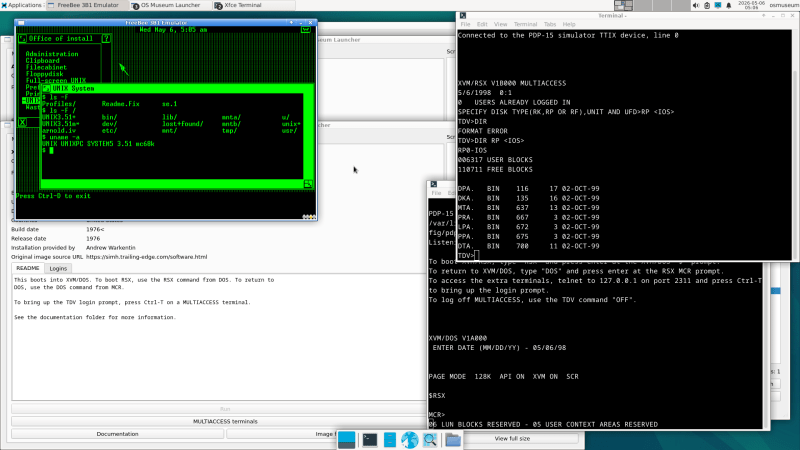
The Virtual OS museum, screenshot

Virtual Museum Hosts Every OS You Haven’t Heard Of

OK, every operating system is a bit of a stretch — Windows Vista notably didn’t make the cut — but [Andrew]’s Virtual OS museum has a good claim to being the most comprehensive archive of operating systems yet assembled.

[Andrew] has a blog post describing the project, as well as a YouTube video that we’ve embedded below. But the real fun is in the downloading and spinning up one of 570+ operating systems for more than 250 platforms on pre-configured virtual machines that have been packaged up for us.

This isn’t just the usual retrocomputer nostalgia-fest of Macintosh System and DOSBox. There’s everything from IBM Big Iron and VAXen to Texas Instrument graphing calculators emulated in the museum, with software to run on them, too. If you’ve ever wondered what you could do with the Manchester Baby, well, all known software for that machine is included with its ‘operating system’.

Admission is free, but like any good museum you’ll be waiting in line a while to get in, so expect the full 128 GB download to take some time. If you’re into computer history, though, it’s going to very much be worth the wait. If you try it and like it, you could help others by seeding the torrent.

The actual museum launches in a VM as a modern Linux system — perhaps that can be considered an exhibit itself — with a launcher to select any of the other system/OS combos, including various other, older Linuxes hosted on their own VMs. There are more to come, too, as [Andrew] continues the long debugging process of making sure everything works as expected.

Purists may decry this virtual emulation as not being quite the real thing, which is true. But while MiSTer supports a lot of cores via FPGA, you probably won’t find everything here on that platform. We have, however, seen an FPGA recreation of the Manchester Baby. More than once, even.

Continue reading “Virtual Museum Hosts Every OS You Haven’t Heard Of”

The ESP8266 Gets An OS, And It’s Familiar

A couple weeks back we brought you news of KernelUNO, a command line shell and very simple operating system for the Arduino Uno. It’s a neat idea, so it’s hardly surprising to see someone port it to another microcontroller and add more features.

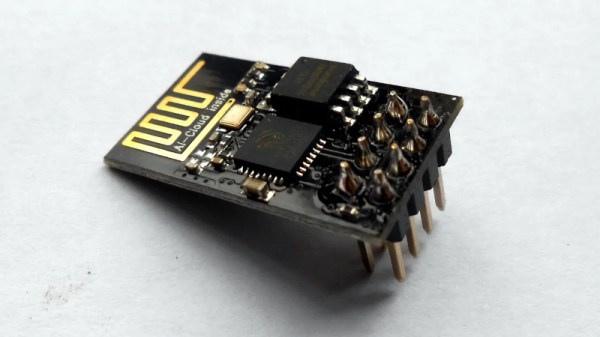
Here’s [hery-torrado], with KernelESP for the ESP8266, which takes the original idea and adds a web console, scheduled jobs, sensor rules, scripting, NTP, and a JSON API. The networking using the ESP’s built-in WiFi takes the original and makes it significantly more useful.

It’s worth suggesting that the ability to call URLs with GET data to pass things to APIs would be useful on a networked processor too, but this is already so well featured it seems rude to ask for more. Yet again though, this project has given a new life to an old chip, and we think it has a way further to go. Perhaps a port to the ESP32 would allow it to reach its full potential, or maybe for a ridiculously cheap and powerful platform, the CH32 series of chips. We look forward to see what more will come from KernelUNO.

Our original coverage can be read here.

Jenny’s Daily Drivers: Going 32-Bit With SliTaz In 2026

We’re used to seeing technologies move with the times, and it’s likely among Hackaday readers are the group who spend the most time doing that and are most aware of it. There’s one which we’ll all be aware of which has quietly slipped away for most of us almost without a word, I speak of course of 32-bit computing. For most of us that means 32-bit computing on x86 machines, and since the 64-bit x86 instruction set we all now use has been around for nearly a quarter century, its 32-bit ancestor is now ancient history.

In the world of software that means we’re now in an era of operating systems and browsers dropping 32-bit support, so increasingly keeping a 32-bit machine up to date will become a challenge. That sounds like something just painful and difficult enough to subject to a Daily Drivers piece, so just how practical is it to use a 32-bit machine for my daily work in 2026?

2005 Just Gave Me A Computer

My trusty Dell, showing the SliTaz desktop
Not looking too bad for a 21 year old laptop.

On my desk I have a Dell Latitude D610. It was made in about 2005 in the days when Dells were solidly made, and with its 1.6GHz Pentium M and 2Gb of memory it represents roughly the final throw of the dice for a 32-bit Intel laptop. Just over a year later it would have been replaced by one of the Intel Core series with the 64-bit instructions grudgingly adopted from AMD, but at the time it was a respectably useful machine.

It came into my possession about eight years ago when I used it to test the Revbank bar tab software for my hackerspace, and for the past six years it’s languished unloved in my box there. It’s got an ancient Ubuntu distro on it, so my first task is to pick a 32-bit replacement from 2026. That’s now a dwindling selection, so it’s time to start digging though some minimalist distros. With the supply of those based on mainstream distros drying up as they drop 32-bit support, it’s time to look into more esoteric offerings. This fits well with the ethos of this series, we’re all about the unusual here.

Cutting out the mainstream based distros certainly narrows the field, and out of the promising contenders in the minimalist field, I went for SliTaz. It uses Busybox and the Openbox desktop, that runs from RAM. I was looking for good application support in the repos, and this distro has the things I need. Download it, stick it on a USB stick, and let’s see what it can do. I know one thing, I wouldn’t have been able to download that ISO in five seconds with the internet connection I had in 2005. Continue reading “Jenny’s Daily Drivers: Going 32-Bit With SliTaz In 2026”

KernelUNO, An OS For The Arduino Uno

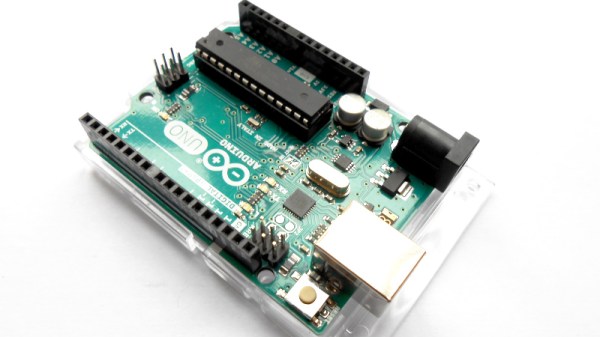
If you were to point to a single device responsible for much of Hackaday’s early success, it might be the Arduino Uno. The little board from an Italian university with its easy to use dev environment changed microcontroller hacking forever, and while it’s now very much old hat, its shadow lies long across single board computing.

Just in case you thought there wasn’t much more life in that old AVR in 2026, along comes [Arc1011], with KernelUNO, describing itself a “A lightweight RAM-based shell for Arduino UNO with filesystem simulation, hardware control, and interactive shell“. It’s an OS for your Arduino, of sorts.

For flashing it to your Uno, you get a shell with some familiar looking filesystem and system commands, the ability to write to files though no editor, and a set of commands to control pins. It’s extremely basic, but you can see the potential.

If we were to speculate as to how this might become more useful then perhaps it might involve a more permanent filesystem perhaps on a flash chip. If possible, the ability to run script files containing a list of commands would also be very nice. Though we are guessing that maybe the reason these features are not in place lies in the meager specifications of an ATmega328, for which we can’t blame the developer at all. Even if it can’t be extended in this way though, it’s still a cool project.

We have to go back quite a while, but this isn’t the first time something like this has appeared on these pages.